

TLDR;
The rapid development of Artificial Intelligence in recent times has led to the efforts of virtually every industry to keep pace with this development, emerging new technologies, new architectures, new vulnerabilities, and new concepts. It is an inevitable field that almost everyone has encountered-either directly or indirectly-spent time learning about, and gotten their hands dirty with. Some concepts, architectures, and protocols are still very new and in the development phase.
As with almost everything else in the world, the security and regulation of new concepts related to AI must be considered. Understanding how these new concepts work, evaluating them from a security perspective, and contributing to their development is the sole responsibility of security researchers.
At this point, a relatively new protocol I came across related to agentic payment methods caught my attention: Google’s Agent Payments Protocol (AP2). I spent some time trying to understand this protocol, how it works, and some aspects of its security. While reviewing some previous security research on AP2, I noticed that most studies focused solely on the question of “how can we trick the LLM?” Google’s Agent Payments Protocol (AP2) clearly states the following in the first paragraph of its security document:
“AP2 assumes that preventing prompt injection attacks is infeasible. Therefore, all LLMs and Agents MUST be considered potential attackers and are explicitly included in the threat model.”
This blog post focuses specifically on the mandates signed by users-an aspect that often goes overlooked-and the gaps in the SDK, which lie at the heart of the protocol. Our question is this: If the agent has already been compromised, does the protocol’s cryptographic layer still protect you? Which controls can you leave to the SDK, and which ones must you handle yourself?
Most of the behaviors in this post are not new; many are logged in AP2’s own issue tracker, and some were reviewed by Google and marked as “intended behavior.” One of them I reported myself (see below). This post is not a “0-day disclosure.” It gathers these scattered behaviors into a single working lab and shows what they mean from an integrator’s perspective.
AP2
Before we move on to our scenarios, we need to understand the protocol itself a bit. Why it’s used, how it’s used, and so on.
The Problem
AI agents are now present in every aspect of our lives. They write code for us, perform analyses, handle technical tasks, conduct security tests, and organize our daily lives. Of course, it’s only natural to imagine AI agents making purchases for us during this period (or in the near future).
How will the merchant and the payment processor know that this agent has actually been authorized by you for this transaction, within the limits you set? This is where both the problem and the solution were born.
The Agent Payment Protocol (AP2), developed by Google, provides a solution to this problem. The trust mechanism here is based not on the Agent, but on the mandates signed by the user. At this point, we encounter two types of mandates.
- Checkout Mandate: What is being purchased (product, seller, price).
- Payment Mandate: How the payment is made.
The two are tied to the same checkout. The merchant signs the checkout as a JWT (checkout_jwt), and both mandates carry a hash of it: the Checkout Mandate in a field called checkout_hash, and the Payment Mandate in a field called transaction_id. This shared value is what links a payment to one specific checkout.
In AP2 v0.1 (September 2025), there were three mandates: the Cart Mandate, the Intent Mandate, and the Payment Mandate. Google’s announcement blog still uses this old term, “Intent Mandate.” v0.2 (April 2026) combined the Cart and Intent mandates into a single Checkout Mandate. Everything in this article is based on v0.2.
Open and Closed Mandates
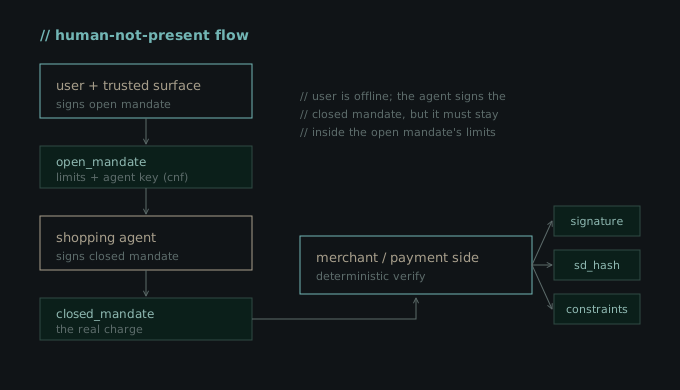
An open mandate is a pre-authorization. It includes constraints such as “Buy these shoes from these stores if the price drops below $100.” It also contains the agent’s public key (in a field called the cnf claim). This ensures that only that agent can use that open mandate.
A closed mandate is a specific transaction that has taken place. It is linked to the open mandate via an sd_hash. (sd_hash is the hash that links the closed mandate to the open mandate from which it originated.)
Additionally, to better understand how AP2 works, it’s helpful to be familiar with the Human Present and Not Human Present workflows.
In the “Human Present” workflow, the user is physically present at that moment and approves the closed mandate themselves.
In the “Not Human Present” workflow, the user signs the open mandate in advance, and then the agent operates autonomously to generate the closed mandate using its own key.
Cryptographic Layer
Mandates are transmitted in SD-JWT format. In a standard signed JWT, all fields are exposed. SD-JWT, on the other hand, allows each field to be “hidden” individually. For instance, when verifying a mandate, you can show only the “$100 limit” portion without revealing your card number.
When it comes to validation, however, the protocol draws a clear line on this issue. At the validation stage, every check must be performed by the code. It should not be left to the agent’s discretion. In fact, the protocol stipulates that if an unrecognized constraint is detected, the validation process must not consider the operation valid.
AP2 Roles
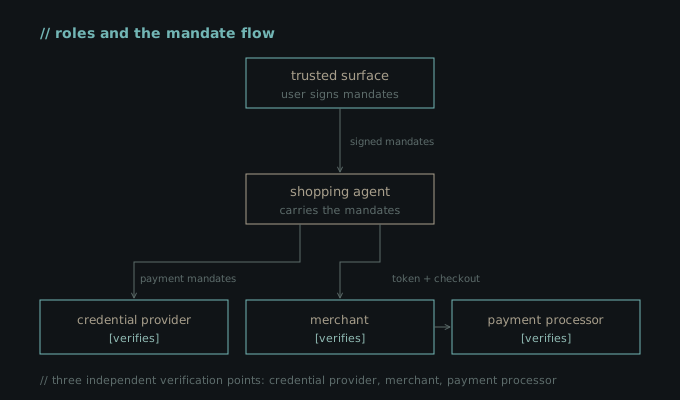
There are five different roles in AP2. A single company can take on several of them at once.
- Shopping Agent: An AI agent that makes purchases on behalf of the user.
- Merchant: The seller.
- Credential Provider: The party that stores the user’s payment information (card, etc.).
- Merchant Payment Processor: The party that processes the payment.
- Trusted Surface: The interface that obtains the user’s consent. It is deterministic and kept outside the LLM’s control, since the user’s approval and signature happen here. The spec gives examples such as a deterministic part of the shopping app, a standalone wallet, or the browser or mobile platform itself.
Verification is not performed at a single location, but at three independent points (Credential Provider, Merchant, Payment Processor). Each of them checks the signature, the sd_hash binding, and the constraints at the code level.
Creating Lab
To start exploring the protocol, we need to set up a small lab. Everything I’ll cover later in this article is based on this lab. I’ve uploaded the lab to the AP2-Security-Lab Repo on my GitHub so you can try it out too.
Installation
Simply follow the installation instructions below. These commands will install the virtual environment, the lab repository, and the AP2 SDK in that order. Note that the “pip install -e .” command must be run from the root directory of the AP2 repository.
python3 -m venv venv
source venv/bin/activate    # Windows: venv\Scripts\activate

git clone https://github.com/mhmtayberk/ap2-security-lab.git
cd ap2-security-lab

git clone https://github.com/google-agentic-commerce/AP2.git
cd AP2
pip install -e .
cd ..
Verification and First Mandate
Let’s verify that the installation is working using 01_setup_check.py. The script signs a Payment Mandate and then verifies it.
signing_key = JWK.from_pyca(ec.generate_private_key(ec.SECP256R1()))
public_key = JWK.from_json(signing_key.export_public())

mandate = PaymentMandate(
    transaction_id="tx-123",
    payee=Merchant(name="Honest Shop", id="shop-1"),
    payment_amount=Amount(amount=1000, currency="USD"),
    payment_instrument=PaymentInstrument(id="pi-1", type="credit"),
)

token = sd_jwt.create(payload=mandate, issuer_key=signing_key).sd_jwt_issuance
resolved = sd_jwt.verify(token, public_key)

What’s happening here is that the sd_jwt.create method signs the mandate with an EC key to generate an SD-JWT, and then sd_jwt.verify verifies the signature using the public key of the same key and returns the data contained within it.
That’s all. Our lab environment is ready. If you’d like, you can take a closer look at the GitHub repository.
The Protocol’s Secure Side
I do not claim that the protocol itself is “very insecure.” Many aspects have been considered from a security standpoint. However, the security of a product, structure, or system is not solely determined by how secure the system itself is. With AP2, we will see what kinds of vulnerabilities can arise if integrators do not implement the protocol correctly. To that end, I’d like to show you a bit more closely how signature integrity and constraints work.
Signature Integrity
Suppose the agent has already been compromised or manipulated. In that case, could the threat actor alter the contents of the mandate signed by the user? For example, could they increase the payment amount or replace the recipient with their own account?
We already know that the Mandate is carried as an SD-JWT. Its structure consists of three parts. These are:
- Signed Header
- Signed Body
- Disclosure
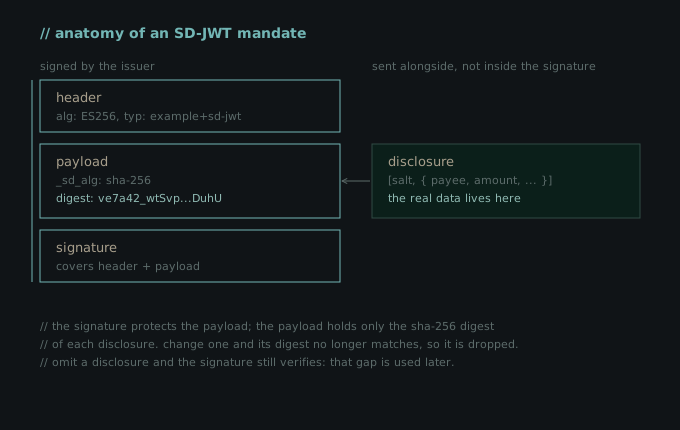
In this setup, we will test three different scenarios. We will attempt to directly modify the signed body, test whether an attacker can sign a fake mandate using their own key, and attempt to inject a fake disclosure that inflates the amount.
Our 05_signature_integrity.py script tests all three of these scenarios.

Our first two scenarios fail during direct signature verification. Our last scenario, however, fails because the digest of the fake disclosure is not in the digest list in the body-that is, in the _sd field. As a result, the verification process does not include it in the payload at all.
In other words, the signature layer does its job. Once a mandate is signed, its content cannot be altered; a mandate with a forged signature or falsified content will not be accepted.
Chain Binding and The Signature Algorithm
In the “human-not-present” workflow, the agent’s closed mandate is appended to the open mandate signed by the user and is linked to it in two ways. The closed mandate is signed with the agent’s key contained within the open mandate, and it contains the cryptographic hash of the open mandate. So, could an attacker take a valid closed mandate and paste it into another user’s open mandate?
The answer is no. The signature does not match the key for that new open mandate, and the hash it carries does not match either. Both checks fail at the same time.
On the other hand, there are classic attack methods in JWT-based systems. These include setting the algorithm to alg=none to completely disable the signature, or tricking the verifier into treating the public key as a password (algorithm confusion).
Since the signature library used by AP2 can distinguish between key types, both attacks fail.

Some Risky Concepts
So far we have only looked at the parts that hold. The signature keeps a mandate from being changed, and a separate, deterministic constraint check enforces the limits the user signed (you can see that check working in 02_constraint_enforcement.py in the repo). Both guarantees rest on two assumptions: the verifier sees the complete mandate, and it actually runs every check.
In this section, however, I will address some risky scenarios arising from incorrect integration by the integrator, situations where the prerequisites are not met.
I didn’t discover most of these behaviors; they’re already logged in AP2’s own issue tracker. The exception is the unknown constraint case below, which I reported in issue #395. What I’m doing here is bringing them together in a working lab and showing what they mean for an integrator.
The Unknown Constraint
There is a clear requirement in the AP2 specification. When a verifier encounters an unknown constraint, it must not treat it as valid; it must treat it as a failure.
“Any unknown Constraints MUST be treated as failing evaluation.”
The constraints of an open mandate are modeled in the SDK as a Pydantic union, and this union has no discriminator. Additionally, all fields of ExecutionDate (one of the constraint types) are optional.
When these two conditions occur together, the result is that when we pass a constraint object with no known fields to the SDK, instead of rejecting it, the SDK silently converts it into an empty ExecutionDate. An empty ExecutionDate, however, does not constrain anything.
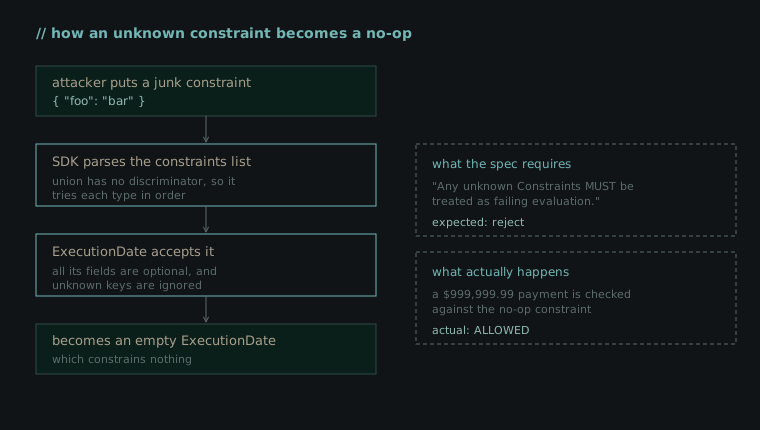
Let’s test this case using our 06_unknown_constraint.py script.

As the output shows, a payment of almost one million dollars passes a constraint that should have failed. I couldn’t find this specific path reported anywhere, so I reported it myself in issue #395. The root cause is a mismatch between the schema and the generated model: the schema marks each constraint’s type as required, but the generated model gives ExecutionDate.type a default value, so an object with no known fields is accepted as an empty ExecutionDate instead of being rejected.
The Withheld Constraint
Let’s take a moment here to recall the structure of the SD-JWT we discussed in the first sections of this article. In a mandate, the signature protects only the payload, but the actual data (amount, merchant, constraints) is stored in separate disclosure blocks. The payload contains only a digest of each block. In this scenario, the party presenting the mandate to the other party can withhold some of the disclosure blocks, and the signature will still remain valid. This is actually a feature intended by SD-JWT.
The problem is that a constraint could also be one of the blocks that can be hidden in this way. In the “human-not-present” flow, the Shopping Agent is the one who presents the mandates to the other party, and according to our threat model, the agent may have been compromised. A compromised agent could hide a constraint signed by the user during the presentation. The signature remains intact because hiding a disclosure does not affect the signature. And since AP2’s verification evaluates only the constraints presented to it, the hidden constraint is treated as if it did not exist.
In our 07_withheld_disclosure.py script, we test this case. Our scenario is as follows: a user signs an open mandate for a maximum of $50. When the compromised agent presents this mandate to the credential provider, it omits the disclosure of the $50 limit. It then attempts a payment of $600.

The output has two lines. The first is the baseline. The agent presents the full mandate, the $50 limit is visible, and the $600 payment is blocked. The second is the attack. The same mandate and the same $600 payment, but the disclosure holding the limit is left out, and the payment goes through. The signature is valid in both cases. The only difference is whether the constraint was shown.
Checkout Binding Verification
Before getting into the details of this case, it’s worth taking a moment to review the structure of AP2. There were two different mandates in a payment transaction. Checkout Mandate, which specifies what was purchased, and Payment Mandate, which specifies how the payment was made. Checkout Mandate contains a checkout_jwt signed by the merchant and a checkout_hash associated with that checkout. The AP2 specification requires the merchant to verify that the hash of the checkout_jwt matches the checkout_hash.
On the SDK side, this verification is optional. The CheckoutMandateChain.verify function takes a parameter called expected_checkout_hash, but if this parameter is not provided, the checkout_hash check is skipped entirely. Furthermore, the SDK does not verify the merchant’s signature on checkout_jwt anywhere; it only reads the data inside it. In other words, both checks are left to the integrator.
We will test this case using our 09_checkout_binding.py script. We are preparing a checkout mandate with both a fake merchant signature and a fake checkout_hash value, and run the verification in two ways. First, without providing an expected_checkout_hash (as the reference example does) and then by providing an independently calculated hash, as the integrator should do.

Is That All?
Not at all. Throughout this blog post, we’ve discussed some of AP2’s secure approaches, the approaches left to the integrator’s discretion despite being specified in the documentation, and the consequences that faulty integrations can lead to. There are numerous issues in Google’s AP2 GitHub repository.
- Once a closed Payment Mandate is accepted, it is not marked as “used,” meaning the same user consent can be reused for multiple payments (issue #346).
- Merchant ID matching relies on fields that appear to be editable (such as name) if a fixed ID is not available (issue #315).
- The currency budget assumes that each currency has 100 subunits, so the limit is inflated by a factor of 100 for currencies with zero decimal places, such as JPY (issues #362, #389).
Some, like the withheld disclosure, Google has already reviewed and classified as intended behavior rather than something to fix, because the protocol’s threat model assumes the agent can be hostile and pushes that responsibility onto the integrator.
The point is this; in this protocol, security does not come solely from the signature; it comes from the integrator plugging the gaps in their own code that the signature does not guarantee.
The Agent Side
Throughout this article, I have deliberately focused on a single layer: the cryptographic verification of mandates. But the attack surface for AP2 is not limited to this. There is also the aspect of the agent itself. Attacks such as tricking the agent into selecting a poor product via prompt injection, serving the agent a spoofed Agent Card, or misdirecting the user’s intent during the presentation phase constitute a separate area of research. There are both academic studies and articles by commercial security teams on this topic.
Resources
If you’d like to learn more about AP2 or are curious about the sources I used while writing this blog post, I’ve included a list of them here.
- AP2 Specification
- Announcing Agent Payments Protocol (Google Cloud)
- AP2 GitHub Repo
- SD-JWT (RFC 9901)
Last Word
If you have any suggestions for the article, please feel free to contact me through any communication channel (LinkedIn, Twitter, Threema, etc.). I am constantly updating the articles in line with your feedback.